Full Song
As Zack did, I wanted to post the full version of my song from Project 1. It is actually two songs, titled “Not Science” and “Numbers Only Go Up”.
2421 Concert 1, Spring 2022
Here are your performances from the 1st concert of the semester, in no particular order. Congratulations – they’re all absolutely spectacular! Unfortunately, there is some extreme video freezing, probably due to CPU shortages on my laptop, which I’ll have to sort out before the next concert(s); however, I am glad that at least these videos offer some kind of documentation for your fabulous performances. Please feel free to share and leave comments on each other’s work, building on from our excellent conversations during the week. Happy Friday!
Nina Yang:
Zachary Bellido:
Will Swartzentruber:
Teddy Rashkover:
Sarah Rubin:
Rae Chen:
Paul Casavant:
Maya Behl:
Matthew Guo:
James Shaul:
Isaac Newcomb:
Faris Aziz:
Damon Hollenbeck:
Brian Chu:
Amy Wang:
Alex Peng:
Complete Future Garage Song – Arrival
Hi everyone! Here’s my full piece called “Arrival” with all of the vocal samples present. I also decided to record some spoken word vocals to add some context to the intro. Hope you enjoy! ~Zack
Assignment 0: Rose Zhou

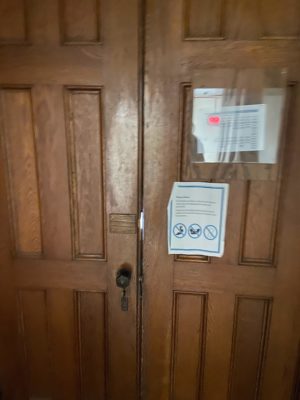
I used to study in the top floors of Willard Strait before Covid in these rooms blocked off by the door. Since it looks like it was closed off when I visited, I sat in the hallway instead, and noticed a lot of foot steps echo loudly from the lower floors. I’m not sure what it is about older buildings but it felt like the footsteps from 2 floors down were louder than my own, and I’m guessing the sounds might’ve amplified as they echoed upwards. It was also so quiet and since the door had a hole in it, I could hear the people on the other side turning pages of a book. Overall, it felt like from where I was that sounds from farther away were so much louder than if they were sourced from the same room as me due to the structure and material of the building. There was also an eerie humming noise that I couldn’t tell what the source was, but might’ve been a bunch of ambient noises that faded and echoed together, so it felt both quiet and not totally quiet in a creepy way.
Assignment 0: Damon Hollenbeck
For assignment 0 I was stuck at home during a blizzard, so I decided to go to our window that looks out on the street and listen to the noises of both the wind and my house. The unpredictable gusts of winds had two main sounds. One was a high pitched wailing of the air escaping past the rubber seams of the window. The other a bassy, whooshing sound. While I was focussing on the wind, I also decided to mess with my radiator. I turned it up and down quickly, releasing these blasts of steam that sounded very cool. Twisting the knob on the radiator made its own creaking noise.
Assignment 0: Nina Yang
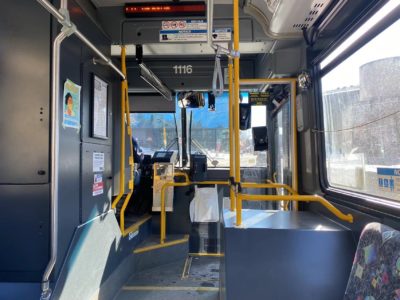
I am on a bus Route 30 from Collegetown to north campus. The bus is a giant beast running in the snow; it squeaks softly in a very high pitch as it brakes on the slippery road. When the road becomes bumpy, its whole body trembles, and the windows shake heavily inside the frames, making sounds of a broken drum. Deep below that, the engine continuously roars like a satisfied big cat, which also gasps occasionally as if it has a runny nose. Humans and machines all talk inside the bus. Before each stop, a female voice says “stop requested” following a gentle beep. A passenger next to me is talking on his phone, and the driver is connecting to someone over the intercom. Sounds from their speakers were somewhat altered and missing a specific range, so they have a signature “machine-altered human voice.” Beyond that, I can hear female and male voices talking in different languages, and I am fascinated by how human have made all sounds they make meaningful.
Assignment 0: Teddy Rashkover
I took a moment to listen to and record some sound near the plant science building, near the ag quad. I was walking back from Bartels to North Campus at night, and there was little traffic around. For a couple minutes of my walk, the only things I heard loudly were my footsteps and a mechanical whir coming from a nearby building. The whir sounded like it had a whistling tone which fluctuated in pitch along with a deep, growling sound, which reminded me of the overdriven bass on Metallica’s Orion. The two sounds seemed to move around in pitch in unison, although they didn’t sound like they made a very clean interval, but it was close to 3 (maybe only 2) octaves apart. My phone’s camera is broken, so I didn’t take a picture.
Assignment 0: Faris Aziz

As I sit comfortably in Duffield, you can imagine the multitude of sounds that you may encounter. Of course, as campus is not as busy, the sounds are similar but with less intensity. I hear the jingle of keys and the soft dinging of an elevator. There’s varying levels of voices that can be found, from soft whispers in the distance to cheerful chatter and laughter. A laptop roughly closes followed by the jingling of a backpack. Through all this, the constant footsteps pass me, like echoing taps on the hard floor. The occasional sliding of feet also can be heard. A door creaks somewhere, and another door closes. The soft yet harsh ventilation system also can be heard alongside with something that sounds like a vacuum.
Plant Science Building Boiler Room
https://drive.google.com/drive/folders/1XlgqgB_IfrQmc3lNqxwyT6iLnb1a3bt6
I spent ten minutes sitting, listening on the stairwell within the multi-level boiler room within the Plant Science building. I was intrigued by the sheer presence of mechanical noise there — it’s loud but not harsh, and the many running boilers, pipes, and other machines whir collectively, each contributing another layer of sound to the room’s ambience. While focusing on ‘deep listening,’ I found it difficult to truly discern where one layer of sound began and another ended — I believe this was because many running machines were two stories or more below where I sat; also, the metal pipes running over my head resonated and echoed the rumbling room, which served to further obscure the sounds’ origins. Occasionally, some distant boiler would hiss out some steam, or another machine would whir to life — these sounds eventually blended in with everything else as my ears acclimated to them. A very deep frequency provided a grounding and encompassing sense of weight and presence that made me feel small and somewhat out-of-place in a room whose purpose is so functional and without superfluity, as I sat, hidden, on the rusty stairwell.

